

Platform layers
LangSmith on AWS deploys in two stages with one optional add-on. The infrastructure stage provisions the cloud foundation. The application stage installs the LangSmith Helm chart. The LangSmith Deployment add-on is opt-in and adds the host-backend, listener, and operator services for managing LangGraph applications from the UI.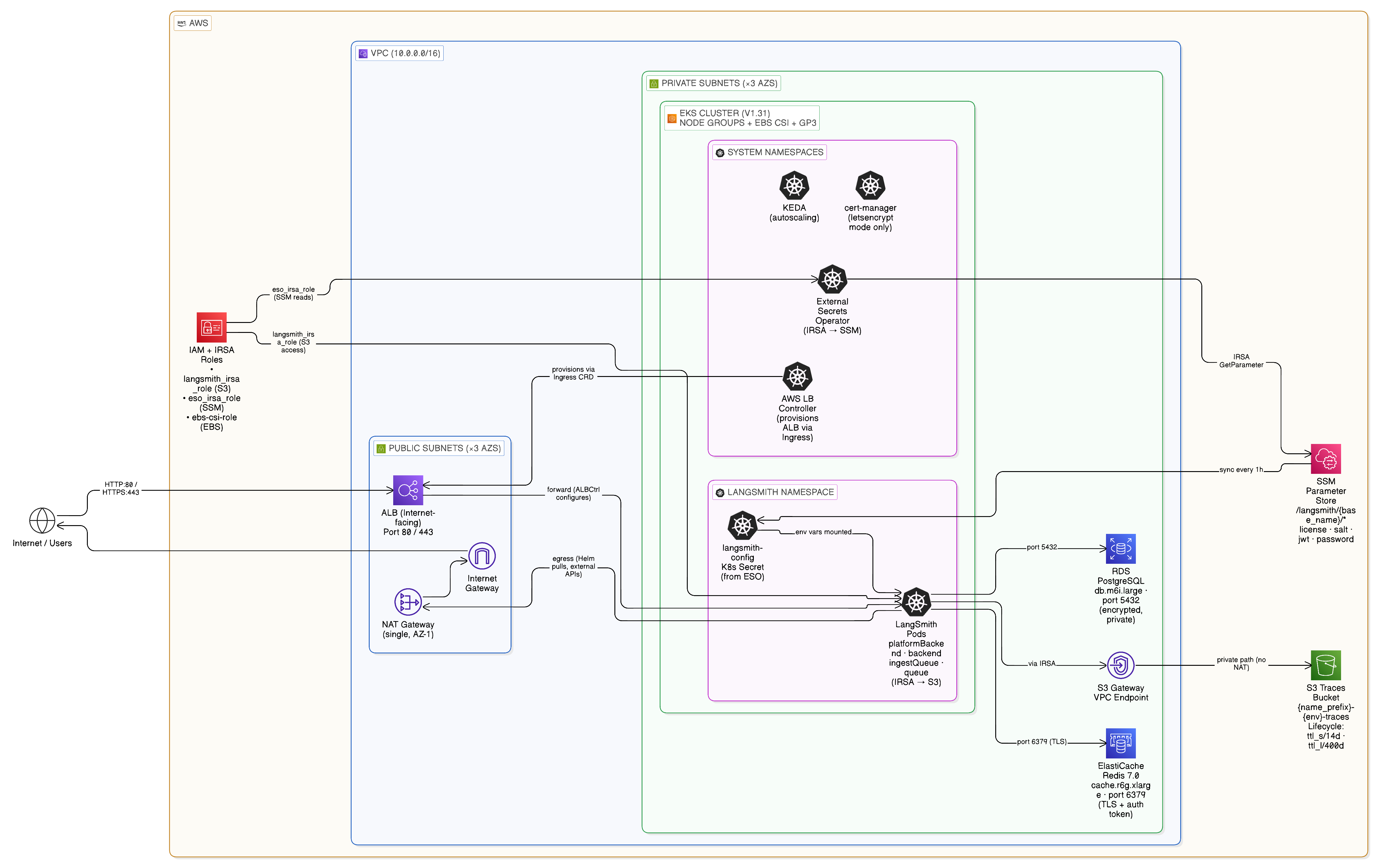
Component to storage mapping
Application core services
These pods run on every deployment. All write logs and metrics; the busier components (backend, queue, ingest-queue) scale horizontally.One-time jobs
The Helm chart runs three jobs at install and upgrade time:LangSmith Deployment add-on
Whenenable_langsmith_deployments = true, three additional services are installed and a LangGraphPlatform CRD is registered. Each deployment the user creates in the LangSmith UI produces a Kubernetes Deployment in the langsmith namespace, managed by the operator.
AWS managed services
Whenpostgres_source = "external" and redis_source = "external" (the recommended production setting), Terraform provisions the following AWS managed services:
RDS PostgreSQL
- Default size:
db.t3.large, private subnets, port 5432. - Holds orgs, users, projects, API keys, settings.
- Secret flow: SSM
/langsmith/{base_name}/postgres-password→ ESO →langsmith-config.
ElastiCache Redis
- Default size:
cache.m5.large, private subnets, TLS port 6379. - Trace ingestion queue, pub/sub, short-lived cache.
- Secret flow: SSM
/langsmith/{base_name}/redis-auth-token→ ESO →langsmith-config.
S3 bucket
- Trace payloads: large inputs and outputs, attachments.
- IRSA via
langsmith_irsa_role(no static keys). VPC Gateway Endpoint, no public internet. - Prefixes:
ttl_s/(short TTL) andttl_l/(long TTL). - Always required. Disabling blob storage breaks the cluster on large payloads.
SSM Parameter Store
- Centralized secret store for all LangSmith secrets.
- Flow:
source infra/scripts/setup-env.shwrites secrets to SSM. The ESOClusterSecretStorereads them and projects alangsmith-configKubernetes Secret that the Helm chart mounts viaconfig.existingSecretName. - Prefix:
/langsmith/{name_prefix}-{environment}/.
Cluster infrastructure
Thek8s-bootstrap Terraform module installs the cluster-level services that LangSmith depends on:
IRSA roles
IRSA replaces static credentials. The EKS cluster’s OIDC issuer is the trust anchor; service accounts inlangsmith and kube-system are annotated with role ARNs and pods receive temporary credentials via the EKS token webhook.
Network topology
Default — ALB ingress
Envoy Gateway — opt-in
Egress path with Network Firewall
Whencreate_firewall = true, all outbound internet traffic from private subnets is inspected before reaching the NAT gateway:
Ingress options
Four mutually exclusive ingress options ship with the modules. The choice determines whether split dataplane (agent pods in a separate namespace) is supported.Why ALB cannot support split dataplane
Standard Kubernetes Ingress is namespace-scoped. The ALB controller routes only to services in the same namespace as the Ingress resource. Agent pods inlangsmith-agents are invisible to an Ingress in langsmith. Envoy Gateway and Istio both support cross-namespace routing via the Kubernetes Gateway API.
ALB plus Envoy Gateway (chained)
When the existing ALB already provides SSO (Okta or Cognito OIDC), WAF, and TLS, Envoy Gateway slots in behind it instead of replacing it:helm/values/examples/langsmith-values-ingress-envoy-gateway.yaml in the modules repo for the values overlay.
TLS and DNS
Thetls_certificate_source variable controls the certificate strategy:
Why ACM versus cert-manager
ACM certificates are non-exportable. AWS attaches them directly to the ALB, which makes ACM the right choice when TLS terminates at the ALB. ACM cannot be used when TLS terminates inside the cluster (Istio Gateway, Envoy Gateway) because those gateways require the certificate material as a Kubernetes Secret. cert-manager handles in-cluster TLS for Istio and Envoy. Theletsencrypt value is a reference implementation: it installs cert-manager and a Let’s Encrypt ACME ClusterIssuer. In production, swap the ClusterIssuer for any cert-manager-compatible issuer.
The Terraform module provisions the cert-manager IRSA role and Route 53 permissions. Only the
ClusterIssuer manifest changes between issuers.
Auto-provisioned DNS
Whenlangsmith_domain is set and acm_certificate_arn is empty, Terraform activates the dns module which creates:
- A Route 53 hosted zone for the domain.
- An ACM certificate with DNS validation records.
- A Route 53 alias record pointing the domain to the ALB.
langsmith_domain with tls_certificate_source = "none" first. Terraform creates the hosted zone and certificate without blocking on validation. Delegate the NS records at your registrar, then flip to tls_certificate_source = "acm" in a later apply. Terraform blocks until the certificate validates and wires it into the HTTPS listener.
Bring your own certificate
Setacm_certificate_arn directly to skip the dns module. For in-cluster gateways, create a Kubernetes TLS Secret manually and reference it in the Gateway or VirtualService.
Module dependency graph
Opt-in security modules
Default resource sizes
For production sizing recommendations, see the scaling guide and the AWS deployment guide.
Validated behaviors and known constraints
These constraints were validated during the April 2026 gateway permutation test run.Verification commands
Connect these docs to Claude, VSCode, and more via MCP for real-time answers.