

Platform layers
LangSmith on Azure deploys in stages. Each stage adds a capability layer on top of the previous. All layers share the same AKS cluster andlangsmith namespace.
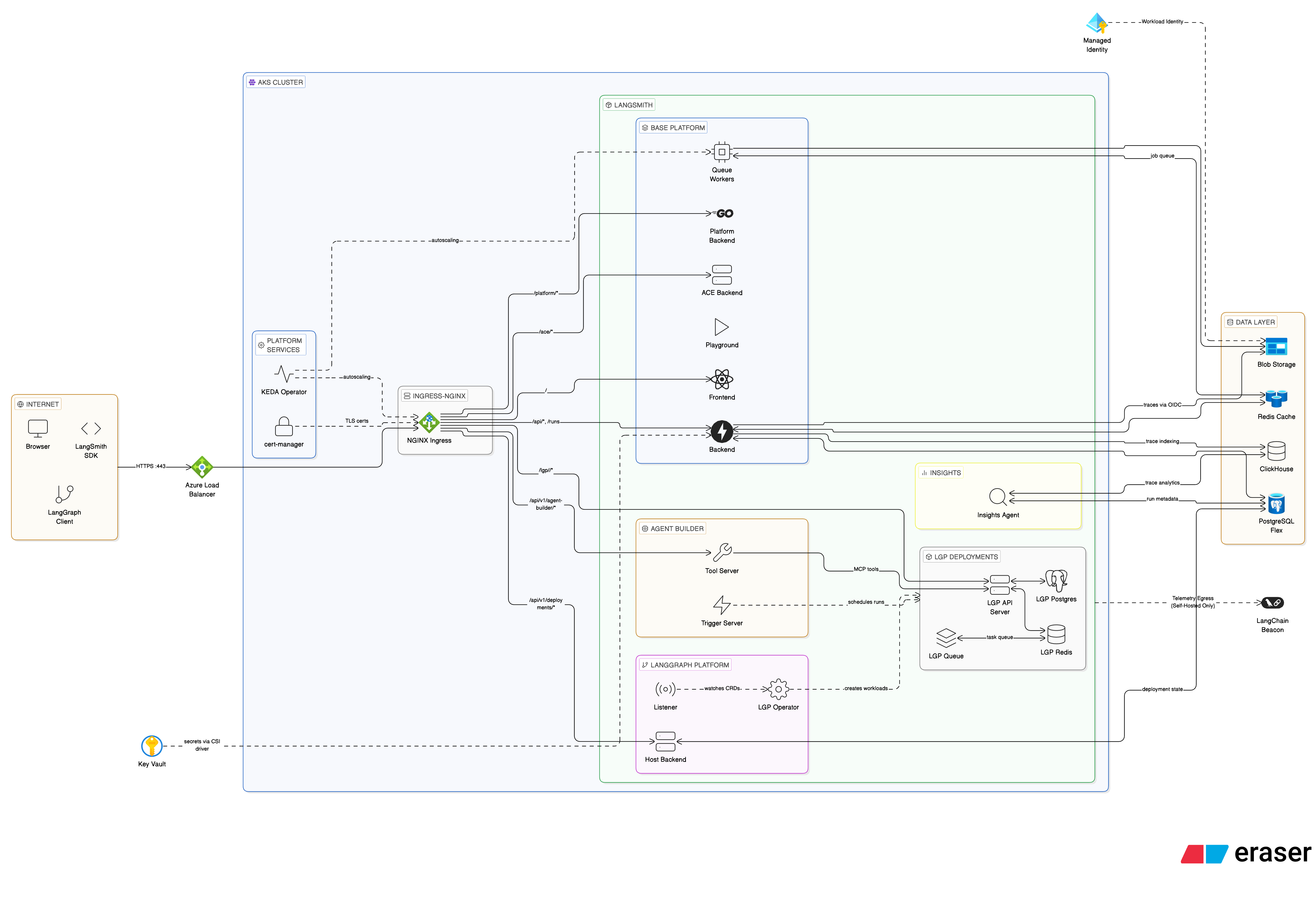
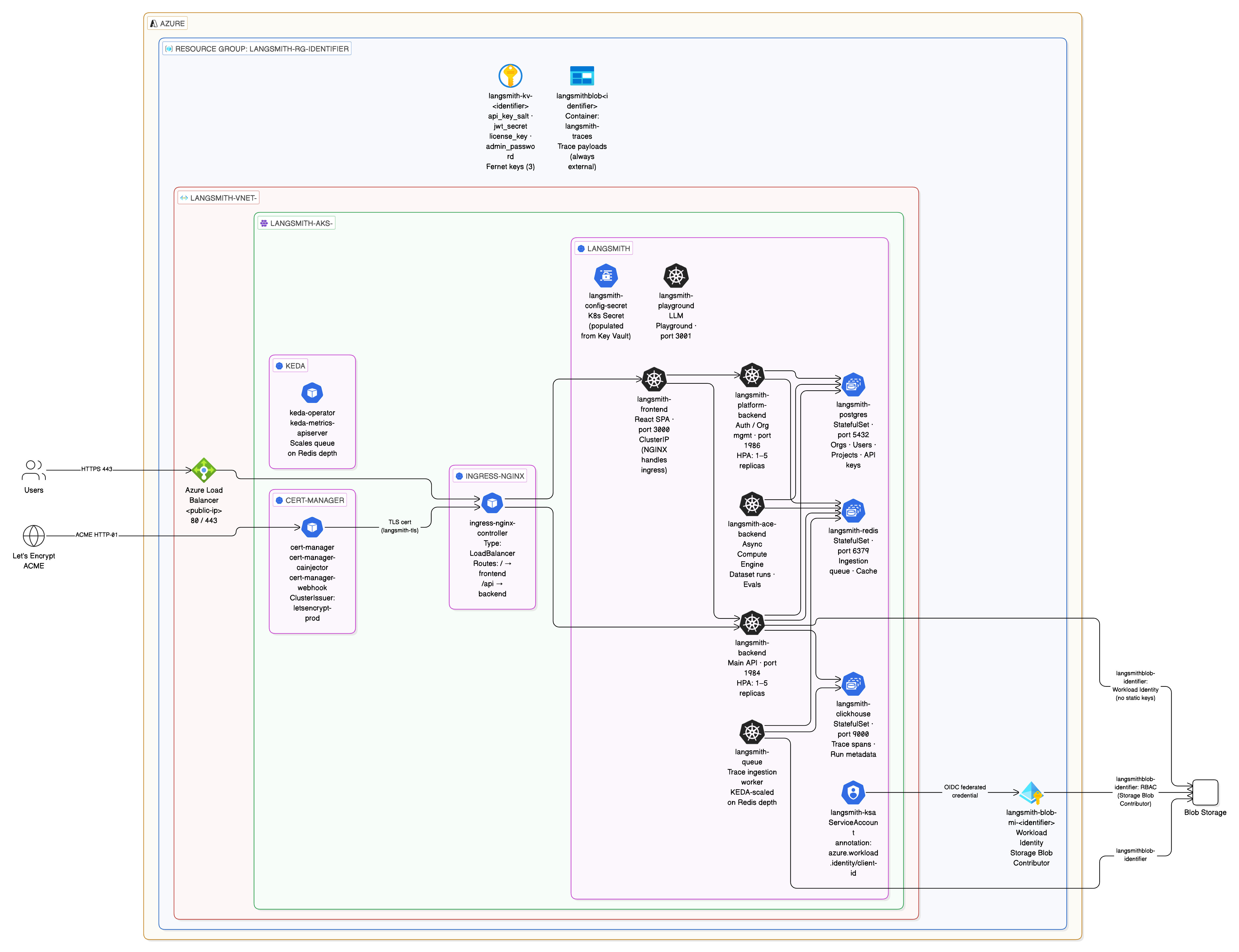
Application deployment paths
The Terraform path uses the
app/ module. make init-app calls app/scripts/pull-infra-outputs.sh to read all infra outputs and write them into app/infra.auto.tfvars.json.
Deployment tiers
Light deploy (all in-cluster)
terraform.tfvars:
BUILDING_LIGHT_LANGSMITH.md in the Azure module repo.
Production (external managed services)
Networking
Light deploy
Production
Application core services
One-time jobs
LangSmith Deployment add-on
Agent Builder add-on
Insights and Polly add-on
Insights/Clio: No static pods. Deploys lazily as a dynamic LangGraph deployment via the operator on first UI invocation. Readsinsights_encryption_key from langsmith-config-secret. Never rotate this key — it permanently breaks existing Insights data.
Polly: Runs as a dynamic LangGraph deployment. Resource limits 2 CPU / 4 Gi request, 4 CPU / 8 Gi limit, scales 1 to 5 replicas. Reads polly_encryption_key from langsmith-config-secret. Same rotation warning as Insights.
Azure managed services
Whenpostgres_source = "external" and redis_source = "external" (the recommended production setting), Terraform provisions:
Azure DB for PostgreSQL Flexible Server
- Holds orgs, users, projects, API keys, settings.
- PostgreSQL ≥ 14 required (Azure Flexible Server defaults to 16).
- Extensions enabled automatically by the
postgresmodule:btree_gin,btree_gist,pgcrypto,citext,ltree,pg_trgm. - Private VNet only (
subnet-postgres), SSL port 5432. - Secret:
langsmith-postgres-secret, created by thek8s-bootstrapTerraform module.
Azure Cache for Redis Premium
- Trace ingestion queue, pub/sub, short-lived cache.
- Redis ≥ 5 required (Premium tier defaults to Redis 6).
- Each LangSmith installation must use its own dedicated Redis. Shared instances cause deployment tasks to route incorrectly.
- Private VNet only (
subnet-redis), TLS port 6380. - Secret:
langsmith-redis-secret, created by thek8s-bootstrapTerraform module.
Azure Blob Storage
- Trace payloads: large inputs and outputs, attachments.
- Workload Identity (no static keys) via the
k8s-app-identityManaged Identity. - Always required. Disabling blob storage breaks the cluster on large payloads.
- Prefixes:
ttl_s/(14-day TTL),ttl_l/(400-day TTL).
Azure Key Vault
- Centralized secret store for all LangSmith secrets.
- Secret flow:
az keyvault secret show→kubectl create secret generic langsmith-config-secret.
Workload Identity
Azure AD token exchange happens via the AKS OIDC issuer. Pods access Blob Storage without static keys.modules/k8s-cluster/ alongside the managed identity and OIDC issuer, which avoids circular dependencies and simplifies adding new ServiceAccounts.
Which pods need Workload Identity
Every pod that reads blob storage env vars must have:- A federated credential registered in Terraform (
modules/k8s-cluster/main.tf). - The
azure.workload.identity/use: "true"label on the Deployment. - The
azure.workload.identity/client-idannotation on the ServiceAccount.
All federated credentials are registered in
modules/k8s-cluster/main.tf under service_accounts_for_workload_identity. Adding a new pod that accesses blob storage requires adding its ServiceAccount name to that list and running terraform apply -target=module.aks.
What breaks without it
Secret flow
secrets.auto.tfvars is never committed. It is regenerated from Key Vault on any machine by running ./setup-env.sh. Terraform is the sole writer to Key Vault; setup-env.sh only reads from it after the first apply.
Ingress options
Azure Public IP DNS labels (
dns_label) work with all controllers. deploy.sh applies the service.beta.kubernetes.io/azure-dns-label-name annotation to the correct LoadBalancer service based on the chosen controller.
For the full TLS compatibility matrix and per-controller setup, see INGRESS_CONTROLLERS.md in the Azure module repo.
Resource sizing
Four sizing profiles are available.AKS node pools
ClickHouse (when in-cluster) requests 2 to 4 CPU and 8 to 15 GB RAM depending on profile. With LangChain Managed ClickHouse, the
large pool is only needed for LGP operator-spawned agent pods.Optional modules
Each module is count-controlled (0 disabled, 1 enabled). Enable any combination; the core deployment (Passes 1 to 5) works without them.
Connect these docs to Claude, VSCode, and more via MCP for real-time answers.